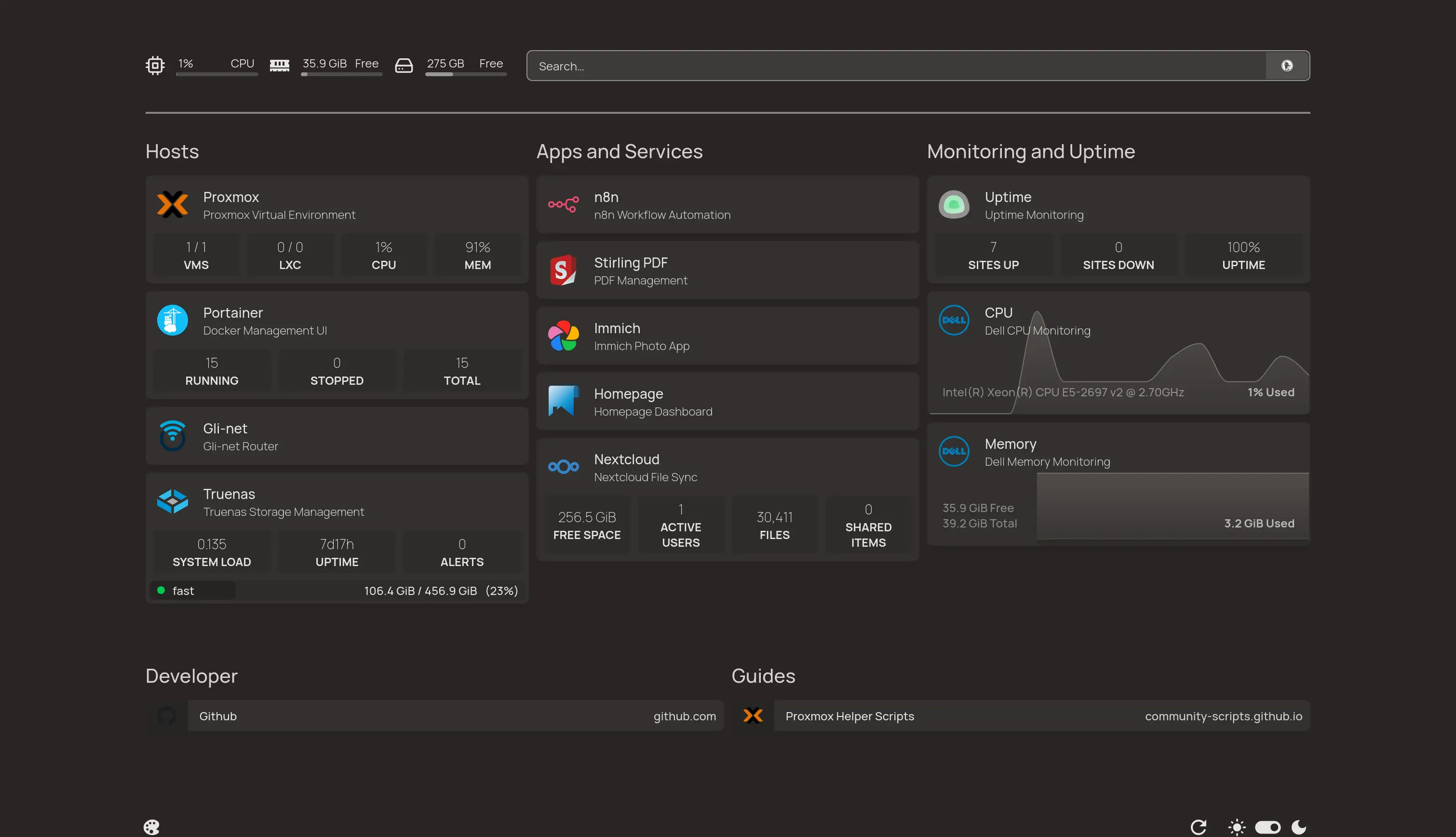
After watching content from YouTubers like Jeff Geerling, FUTO, Hardware Haven, Raid Owl and Louis Rossmann, I thought it was about time to switch apps and services that I use daily to privacy friendly alternatives. I thought this was gonna be few docker run commands and man it was one deep rabbit hole.
Motivation for Self-hosting
Watching daily posts in LinkedIn by colleagues and my old classmates completing Amazon Web Services, Google Cloud Platform, Microsoft Azure certifications, I thought maybe it is wise to learn and complete one of these courses and deploy on one of BIG3 Cloud services. Doing this I learn and earn popular certification and I get to deploy in Cloud. Later I found this is a big mistake.
Cloud certifications are BAD idea, if you want to learn fundamentals
So, I started AWS Cloud practitioner, which is the first certification in AWS, oh boy! It was almost like teaching kids - you learn from basics but only how to work and deploy in AWS console. I finished it, learned nothing like how to work with linux on servers, firewalls...
Anyway I went to AWS to deploy some apps which I am researching to self-host like Nextcloud, Immich and Kavita.
My data is over 500GB including Photos, Docs, E-books and some other backups and the price to run small EC2 with 8GB RAM and 4 CPU cores is over 40 euros. If my data is scaled and I started running more services, I will be paying over 80 euros per month which is not at all sustainable.
Alternatives
Like every other problem, I searched for solution in google, reddit and came across two solutions:
- Hetzner: They offer cloud computing, storage and backup for cheap. Using them and I can cut down my monthly price to around 20 euros.
- PikaPODS: They are new but can deploy OSS Apps and Services without any config. Best for deploy and forget.
My Current Setup
During this time there was a funny challenge going between YouTubers Hardware Haven and Raid OWL who can build best homelab with 200 dollars and that hit me, why shouldn't I buy old enterprise hardware from ebay or resellers and run my own homelab and self-host on premises.
1. PROXMOX on DELL Precision T3610
I bought this on ebay for 50 euros with shipping. It came with 16GB 1800MHz ECC DDR3 memory and 4 core XEON E2. I wanted this to be main server which runs apps. From my research, I learned having more memory is important than faster CPU. Having more cores and threads also will be helpful.
Armed with this knowledge, I went shopping on Aliexpress and bought a monster CPU supported by this PC, a 12 core 24 thread XEON E5 2697 with lots of PCIE lanes. I installed PROXMOX (HYPERVISOR) and gave all cores and memory except 1 core and 1GB to my debian VM. This runs all my services now.
Current SPEC of Dell:
- 24 Thread XEON E5 2977 V2
- 48GB ECC 1800MHZ DDR3 RAM
- 2 * 128GB SSDs for RAID boot of PROXMOX
- 2 * 1GbE NICS
- 1TB NVME SSD for debian VM
2. TrueNAS Scale on Fujitsu ESPRIMO E95
For 40 euros, I got these 2 fujitsu MICRO PCs with 8GB RAM each and no SSD. Again I went to ebay and bought some stuff and maxed out one of them. This is running TrueNas Scale for NAS storage and backups.
Current SPEC of Fujitsu:
- 4 Thread Intel i5 6500
- 32GB non ECC 2400MHZ DDR4 RAM
- 1 * 128GB SSD for boot of TrueNas Scale
- 2 * 1GbE NICS
- 4 * 256GB SSDs for TrueNas Dataset
3. Ubuntu Server on ACER Laptop
This might be funny, but I have an old acer laptop which I have been using for 3 years very roughly. It went through 2 battery replacements and multiple OS changes. The battery was dead for 3rd time and ports on left side stopped working. I got M.2 WIFI key to 2.5GbE adapter and installed Ubuntu server.
This serves as playground or test stage before I deploy any services on my debian VM.
4. Networking and Switching
I decided to spend 30 euros and bought GLinet OPAL travel router and a switch for 5 euros from Aliexpress. This GLinet router connected to our home central WIFI via 5Ghz and provides LAN. I also setup Adguard home and OpenVPN server using Dynamic DNS.
5. Apps and Services I run
| App | Description |
|---|---|
| Homepage | Dashboarding interface for at-a-glance metrics |
| Nextcloud | Self-hosted file storage and cloud sync |
| Immich | Photo and video management platform |
| Stirling PDF | PDF conversion and editing suite |
| n8n | Workflow automation engine |
| Uptime Kuma | Container monitoring dashboard |
| Glances | Lightweight server monitoring tool |
| Watchtower | Automated container updater |
| Code server | Remote coding environment |
| CD Tunnel | Exposing services to the Public web |
| Portainer CE | Container Orchestration |
Lessons learned
Self-hosting isn't for everyone, but it's an invaluable way to deepen your understanding of cloud computing. By running services on your own hardware, you'll gain hands-on experience with tunnels, port forwarding, firewall configuration, storage management, and more.
Still long way to go... Until next time PEACE